GPT Image 2.5
OpenAI's most advanced AI image generator. Create 4K images from text or edit photos with AI — Sunburst & Flare variants, transparent backgrounds, and 13 aspect ratios in one playground.
GPT Image 2.5 Examples — Portraits Generated & Edited
Every image below was created with GPT Image 2.5 in this playground — two portraits generated from text prompts, and two photos edited with natural language instructions using GPT Image 2.5 image to image.
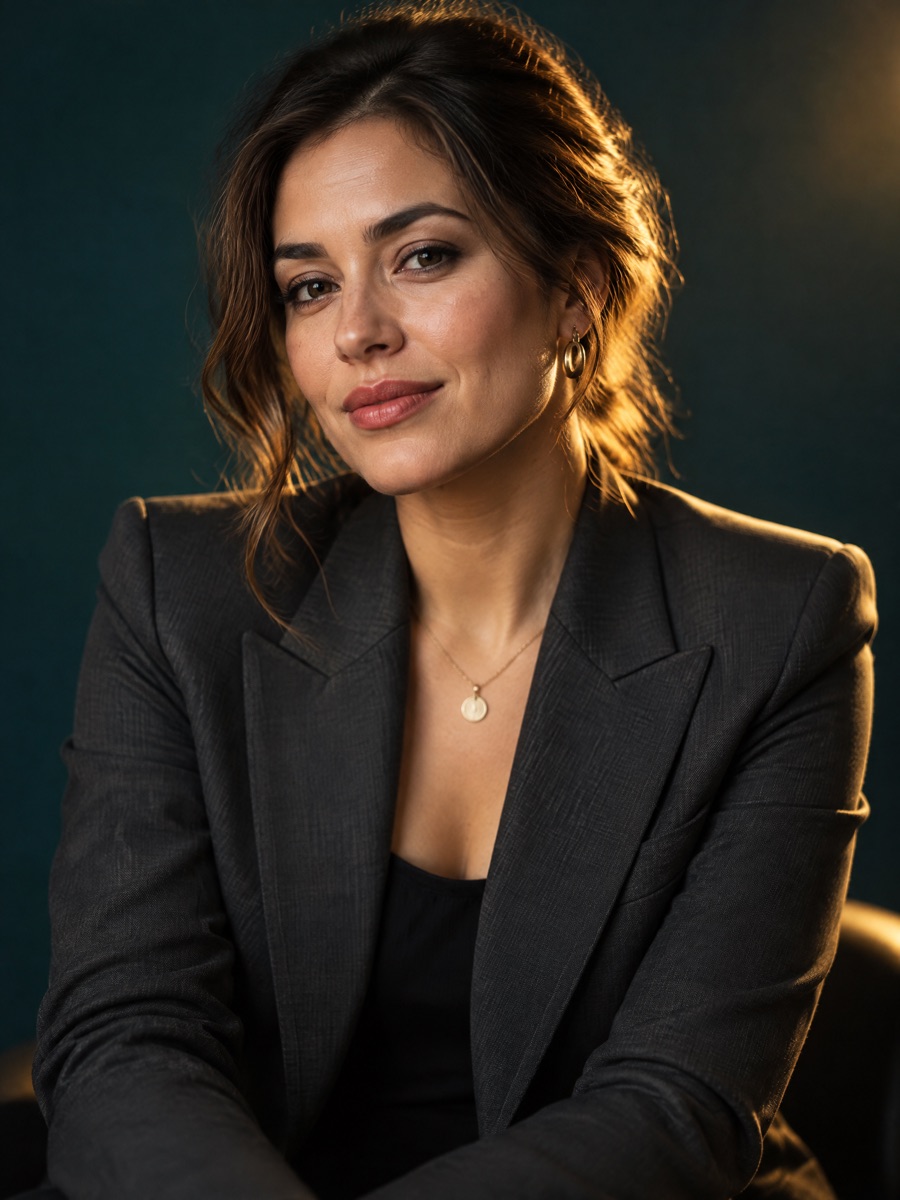
Studio Portrait from Text
Prompt: “Cinematic studio portrait of a confident female entrepreneur in her early 30s, tailored charcoal blazer, dramatic golden rim lighting, deep teal backdrop, 85mm editorial photography.”
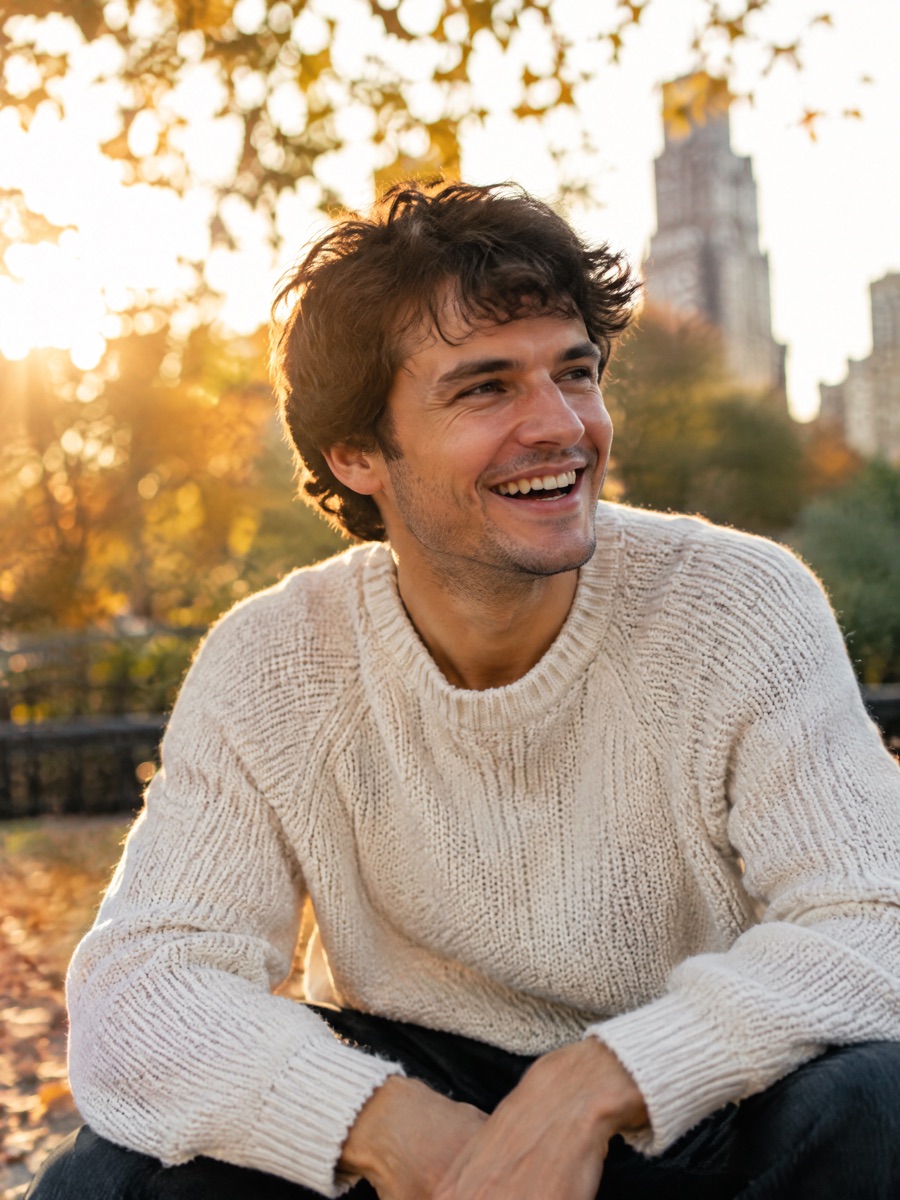
Golden Hour Lifestyle Portrait
Prompt: “Candid lifestyle portrait of a young man laughing warmly at golden hour in a city park, soft natural sunlight through autumn leaves, shallow depth of field, documentary style, 50mm lens.”
Before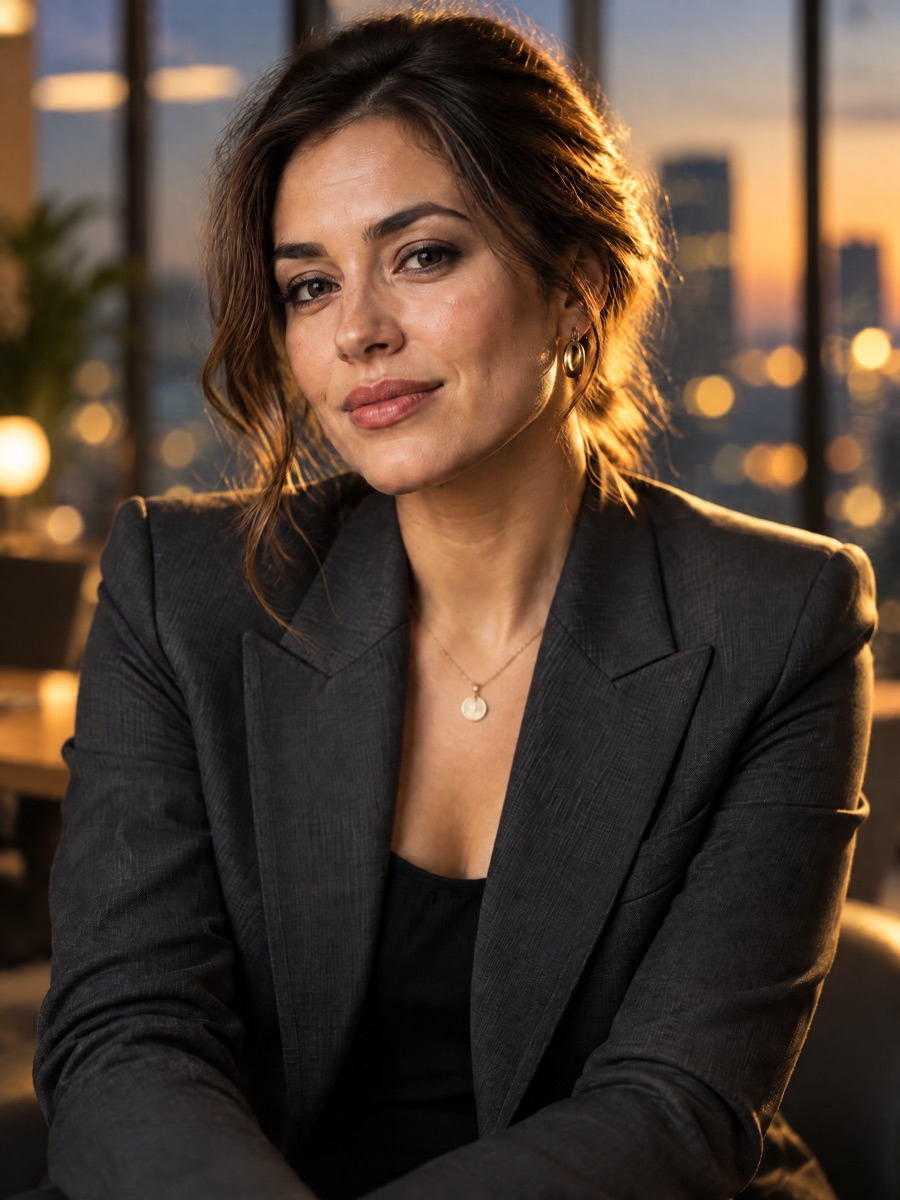 After
AfterBackground Replacement
Prompt: “Replace the background with a softly blurred modern glass office with warm bokeh lights. Keep her face, hairstyle, pose and outfit exactly the same.”
Before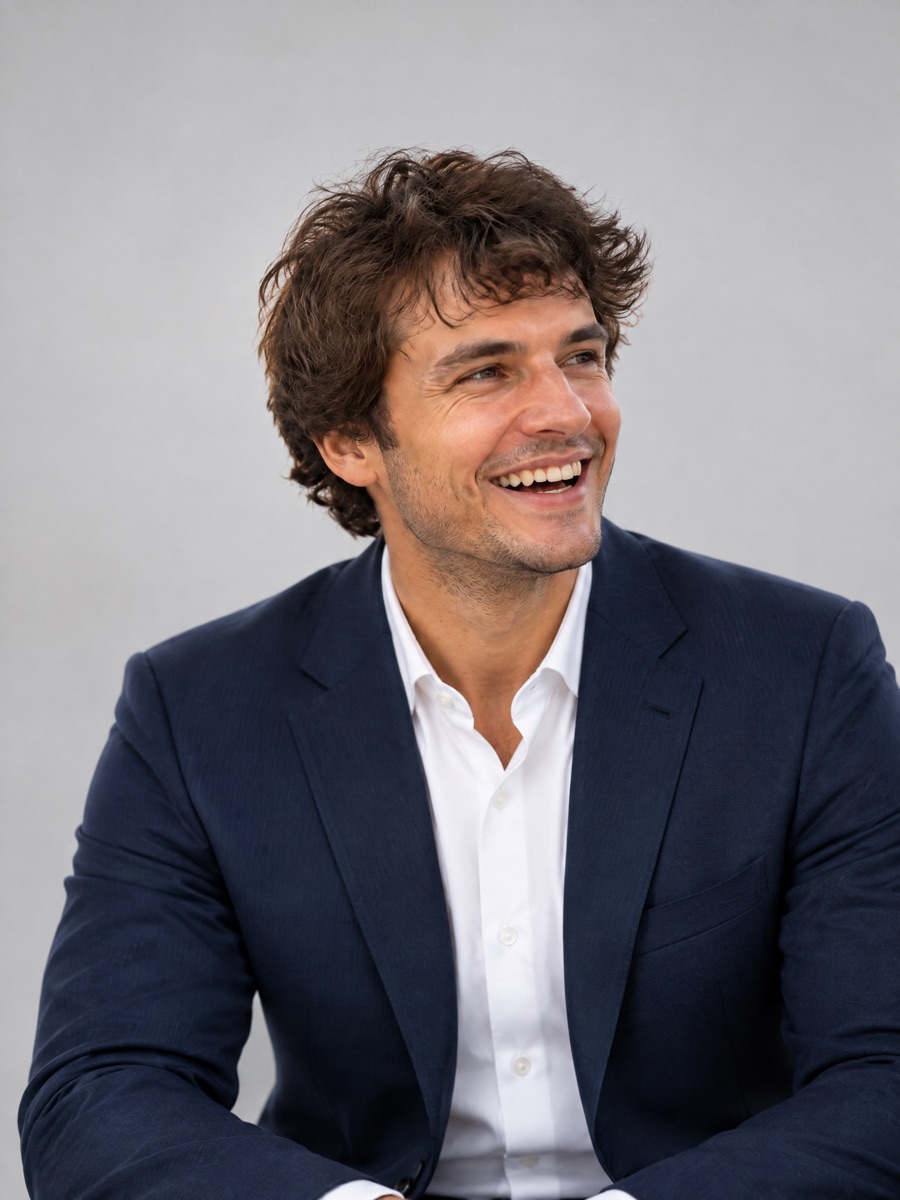 After
AfterOutfit & Style Transformation
Prompt: “Transform into a professional corporate headshot — navy suit, crisp white shirt, neutral light-gray studio backdrop, soft even lighting. Keep his face and smile exactly the same.”
Try these prompts yourself in the GPT Image 2.5 playground above — switch between Sunburst and Flare, or upload your own photo to edit.
How to Use GPT Image 2.5 in 3 Steps
Choose Mode & Variant
Pick text to image or image to image, then select the Sunburst or Flare variant, aspect ratio, resolution, and background mode.
Describe Your Vision
Write a detailed prompt describing the image you want, or the edits to apply to your uploaded photos. Natural language works best.
Generate & Download
GPT Image 2.5 renders your image in up to 4K. Download it, or continue editing with further natural language instructions.
GPT Image 2.5 vs GPT Image 2 vs Nano Banana Pro
Compare GPT Image 2.5 with GPT Image 2 and Nano Banana Pro to find the best AI image generator for your needs.
| Feature | GPT Image 2.5 | GPT Image 2 | Nano Banana Pro |
|---|---|---|---|
| Model Provider | OpenAI (Sunburst / Flare variants) | OpenAI | Google (via Nano Banana Pro) |
| Text to Image | ✅ Excellent | ✅ Excellent | ✅ Excellent |
| Image to Image | ✅ Native, Multi-Image Input | ✅ Native Support | ✅ Multi-Image Reference |
| Text Rendering Quality | ⭐⭐⭐⭐⭐ Near Perfect | ⭐⭐⭐⭐⭐ Near Perfect | ⭐⭐⭐⭐ Very Good |
| Max Resolution | Up to 4K | Up to 2K | Up to 4K |
| Transparent Background | ✅ Native Support | ⚠️ Limited | ⚠️ Limited |
| Model Variants | Sunburst & Flare (A/B in one place) | Single variant | Single variant |
| Photorealism | ⭐⭐⭐⭐⭐ Outstanding | ⭐⭐⭐⭐⭐ Outstanding | ⭐⭐⭐⭐ Very Good |
| Prompt Adherence | ⭐⭐⭐⭐⭐ Best in Class | ⭐⭐⭐⭐⭐ Best in Class | ⭐⭐⭐⭐ Very Good |
| Aspect Ratios | 13 options incl. 21:9, 27:16, 16:27, 9:8, 8:9 | Auto, 1:1, 16:9, 9:16, 3:2, 2:3 | 1:1, 16:9, 9:16, 3:2, 2:3, 3:4, 4:3, 4:5, 5:4, 21:9 |
| Multi-Image Input | ✅ Up to 10 Images | ✅ Supported | ✅ Up to 5 Images |
| Best For | 4K output, transparent PNGs, cinematic ratios, pro work | Professional visuals, text-heavy designs, marketing | High-res output, multi-reference, batch work |
Choose GPT Image 2.5
Best for 4K output, transparent PNG backgrounds, cinematic aspect ratios, and the newest OpenAI image quality with Sunburst and Flare variants.
Choose GPT Image 2
Best for proven photorealistic output and text-heavy designs at standard resolution, often at a lower credit cost.
Choose Nano Banana Pro
Best for multi-image reference workflows, batch image generation, and cost-effective 4K professional projects.
GPT Image 2.5 — The Complete Guide to OpenAI's Latest AI Image Generator
GPT Image 2.5 is OpenAI's most advanced AI image generation model, released in 2026 as the successor to GPT Image 2. GPT Image 2.5 upgrades every part of the pipeline: native 4K resolution output, transparent background generation, 13 aspect ratios including cinematic 21:9, and two specialized variants — GPT Image 2.5 Sunburst and GPT Image 2.5 Flare. Whether you need text-to-image creation or image-to-image editing, GPT Image 2.5 delivers professional results in seconds.
On this page you can try GPT Image 2.5 free — no setup required. Generate images from text prompts, upload photos for AI editing, switch between Sunburst and Flare variants, and download watermark-free results in up to 4K resolution.
GPT Image 2.5 Text to Image — Create Anything from Words
GPT Image 2.5 text to image generation turns detailed descriptions into high-fidelity visuals. The model accepts prompts up to 20,000 characters, so you can describe complex scenes, brand guidelines, typography requirements, and composition notes in a single request. GPT Image 2.5 then renders photorealistic images with the industry-leading text rendering the GPT Image family is known for — logos, posters, and UI mockups come out with correctly spelled, readable text.
Choose from 13 aspect ratios: auto, 1:1, 3:2, 2:3, 16:9, 9:16, 4:3, 3:4, 21:9, 27:16, 16:27, 9:8, and 8:9. That covers Instagram posts, YouTube thumbnails, website hero banners, print layouts, and ultrawide cinematic frames — all from the same GPT Image 2.5 online playground.
GPT Image 2.5 Image to Image — Edit Photos with Natural Language
GPT Image 2.5 image to image editing lets you upload up to 10 reference images and describe the transformation you want. Change styles, replace backgrounds, remove objects, restyle products, or merge concepts across multiple inputs. Unlike older editors that require masks and layers, GPT Image 2.5 works entirely through plain-language instructions like "make the background a sunset beach" or "turn this into a watercolor painting."
A standout workflow is background removal: set the background option to transparent and GPT Image 2.5 returns a clean transparent PNG ready for e-commerce listings, stickers, and design composites — no Photoshop required.
GPT Image 2.5 Sunburst vs Flare — Which Variant Should You Use?
OpenAI ships GPT Image 2.5 in two variants with identical APIs and pricing: GPT Image 2.5 Sunburst and GPT Image 2.5 Flare. The variants differ in their aesthetic tuning — Sunburst tends toward bright, high-energy compositions with punchy contrast, while Flare leans into softer, more naturalistic lighting and gradients.
The best approach is A/B testing: our playground has a one-click variant switcher, so you can submit the same prompt to both GPT Image 2.5 Sunburst and GPT Image 2.5 Flare and pick the output that fits your brand. Both variants support the full parameter set: 4K resolution, transparent backgrounds, and all 13 aspect ratios.
GPT Image 2.5 vs GPT Image 2 — What's New?
Comparing GPT Image 2.5 vs GPT Image 2, the headline upgrade is resolution: GPT Image 2.5 generates natively at 1K, 2K, and 4K, while GPT Image 2 tops out at 2K. GPT Image 2.5 also adds native transparent background output, doubles the aspect ratio selection from 6 to 13 options, introduces the Sunburst and Flare variants, and improves fine detail rendering in skin, fabric, and typography.
GPT Image 2 remains a solid, lower-cost choice for standard-resolution work. But for print-quality output, product photography with transparent backgrounds, or ultrawide 21:9 compositions, GPT Image 2.5 is the clear upgrade.
GPT Image 2.5 vs Nano Banana — How Do They Compare?
In the GPT Image 2.5 vs Nano Banana comparison, each model has clear strengths. GPT Image 2.5 leads in photorealism, prompt adherence, and in-image text rendering — the reasons the GPT Image family dominates marketing and design work. Nano Banana models (powered by Google) are strong at fast iteration and multi-reference consistency.
With GPT Image 2.5 now supporting 4K resolution, transparent PNGs, and up to 10 reference images, most of Nano Banana's former advantages have closed. For a detailed feature-by-feature breakdown, see the comparison table above.
GPT Image 2.5 4K and Transparent Background — Quality That Scales
GPT Image 2.5 4K generation produces images suitable for large-format print, retina displays, and professional product catalogs. Resolution is a single click (1K, 2K, 4K), and credit cost scales with quality — 1 credit for 1K, 2 for 2K, 3 for 4K — so you only pay more when you need more pixels.
Note that the 27:16, 16:27, 9:8, and 8:9 aspect ratios support 1K resolution only; 2K and 4K are available for all other ratios. When generating transparent backgrounds at 2K or 4K, include an instruction describing an isolated subject for the cleanest cutout.
GPT Image 2.5 Use Cases
- GPT Image 2.5 for E-commerce: Product shots with transparent backgrounds, lifestyle scenes, and A/B creative variants via Sunburst vs Flare.
- GPT Image 2.5 for Marketing: Ad creatives, social graphics, and campaign visuals with accurate embedded text.
- GPT Image 2.5 for Design: Logos, posters, icons, and UI mockups in any of 13 aspect ratios, exported up to 4K.
- GPT Image 2.5 for Content: Blog illustrations, YouTube thumbnails (16:9), and vertical shorts (9:16) at consistent quality.
- GPT Image 2.5 for Photo Editing: Background replacement, style transfer, and object editing through natural language image-to-image.
GPT Image 2.5 API — Build It Into Your Product
The GPT Image 2.5 API uses an async job pattern: create a task with your prompt and parameters, then poll for the result URL. Both Sunburst and Flare variants expose the same contract — prompt, aspect_ratio, resolution, and background for text-to-image, plus input image URLs for image-to-image. Every playground feature on this page maps 1:1 to the GPT Image 2.5 API, so what you test here is exactly what you can automate.
GPT Image 2.5 FAQ
Everything you need to know about OpenAI's GPT Image 2.5 image generator and editor Contact Us.
What is GPT Image 2.5?
GPT Image 2.5 is OpenAI's latest AI image generation model, released in 2026 as the successor to GPT Image 2. GPT Image 2.5 supports text-to-image creation and image-to-image editing with native 4K resolution, transparent background output, 13 aspect ratios, and two variants: GPT Image 2.5 Sunburst and GPT Image 2.5 Flare. It delivers improved photorealism, prompt adherence, and text rendering over previous models.
Is GPT Image 2.5 free to use?
Yes, you can try GPT Image 2.5 free on Whisk AI. New users receive free credits to experience GPT Image 2.5 text-to-image and image-to-image generation, including the Sunburst and Flare variants. For unlimited generation, affordable credit packages are available on our pricing page.
What is the difference between GPT Image 2.5 Sunburst and Flare?
Sunburst and Flare are the two GPT Image 2.5 variants. They share the same API, parameters, and pricing, but differ in aesthetic tuning: GPT Image 2.5 Sunburst produces bright, high-contrast compositions, while GPT Image 2.5 Flare leans toward softer, more naturalistic lighting. Our playground includes a one-click variant switcher so you can A/B test both with the same prompt.
Can I use GPT Image 2.5 generated images commercially?
Yes, images generated with GPT Image 2.5 through Whisk AI can be used for commercial purposes including marketing, advertising, product design, social media content, and client projects. GPT Image 2.5 outputs are watermark-free with our service.
How does GPT Image 2.5 text to image work?
GPT Image 2.5 text to image works by analyzing your text prompt and generating a matching image. You describe the scene, style, and composition, choose an aspect ratio, resolution (1K, 2K, or 4K), and background mode — and GPT Image 2.5 renders the result in seconds with high fidelity and accurate embedded text.
How does GPT Image 2.5 image to image work?
GPT Image 2.5 image to image lets you upload up to 10 images and describe changes in natural language. GPT Image 2.5 supports background replacement, style transfer, object addition and removal, and multi-image composition. Simply type instructions like 'change the background to a beach' and the model applies the edits while preserving the original image's integrity.
Does GPT Image 2.5 support 4K resolution?
Yes, GPT Image 2.5 generates images at 1K, 2K, and 4K resolution. Note that the 27:16, 16:27, 9:8, and 8:9 aspect ratios support 1K only; all other aspect ratios (including auto, 1:1, 16:9, and 21:9) support the full range up to 4K. Credit cost scales with quality: 1K costs 1 credit, 2K costs 2, and 4K costs 3.
Is there a GPT Image 2.5 API?
Yes, the GPT Image 2.5 API is available for both Sunburst and Flare variants using an async job pattern: create a task with your prompt, aspect ratio, resolution, and background parameters (plus input image URLs for image-to-image), then poll for the result URL. Every feature in our playground maps directly to the GPT Image 2.5 API.
Can GPT Image 2.5 generate transparent backgrounds?
Yes. GPT Image 2.5 has a native background parameter with three modes: auto, transparent, and opaque. Set it to transparent to get clean transparent PNGs for e-commerce listings, stickers, and design composites. For transparent backgrounds at 2K or 4K, include an instruction describing an isolated subject in your prompt for the cleanest results.
What aspect ratios does GPT Image 2.5 support?
GPT Image 2.5 supports 13 aspect ratios: auto, 1:1, 3:2, 2:3, 16:9, 9:16, 4:3, 3:4, 21:9, 27:16, 16:27, 9:8, and 8:9. This covers social media posts, video thumbnails, print layouts, and cinematic ultrawide frames. The 27:16, 16:27, 9:8, and 8:9 ratios are limited to 1K resolution.
GPT Image 2.5 vs GPT Image 2 — which is better?
GPT Image 2.5 is a clear upgrade over GPT Image 2. GPT Image 2.5 adds native 4K resolution (GPT Image 2 maxes out at 2K), transparent background output, 13 aspect ratios instead of 6, and the Sunburst and Flare variants. GPT Image 2 remains a solid lower-cost option for standard-resolution work, but for print quality and ultrawide compositions, GPT Image 2.5 is the better choice.
GPT Image 2.5 vs Nano Banana — which should I choose?
GPT Image 2.5 excels at photorealism, prompt adherence, and text rendering within images, making it the top choice for marketing materials, product photography, and text-heavy designs. Google's Nano Banana models are strong at fast iteration. With GPT Image 2.5 now supporting 4K output, transparent backgrounds, and up to 10 reference images, most former Nano Banana advantages have closed.
Elevate Your Creativity with Whisk AI - The Innovative Image Generator!
Ready to transform your ideas into captivating visuals effortlessly? Join Whisk AI (also known as wisk ai, whiskai, whisky ai) and experience the power of AI-driven image generation tailored to your creative vision!
Start Your Creative Journey Today